Overview
ESP was a SaaS-based employee engagement and workforce platform for Employee Experts Solutions. I designed and implemented major parts of the product experience from scratch, including the employee landing page, HRMS workflows, LMS dashboard, admin experiences, mobile-responsive behavior, PWA support, and the public Employee Experts website.
This was an early-career role, but the work had a senior-level product challenge: bring many daily workplace activities into one clear platform without making the interface feel crowded or confusing.
Product Context
Employee Experts was building a cloud-based HRMS and LMS platform for connected enterprises. The product needed to support employees, managers, HR teams, payroll teams, learning administrators, and company leadership.
The platform covered:
- Employee personal information and profile management
- Leave, attendance, time, payroll, projects, and work activities
- Team visibility, availability, communication, and collaboration
- Tickets, alerts, approvals, notifications, tasks, feedback, and employee wall updates
- Learning management, courses, certifications, assessments, rewards, and schedules
- Admin-level configuration and operational management
- Public website experience for product positioning, lead generation, and demo requests
The deeper challenge was information architecture. Every module was useful, but if everything competed for attention, the landing page would fail.
My Role
As the UI/UX Engineer, I worked across product thinking, interface design, front-end implementation, responsive behavior, and stakeholder feedback cycles.
My responsibilities included:
- Designing the ESP employee landing page and core information architecture
- Implementing the LMS SaaS dashboard experience from scratch
- Designing the Employee Experts public website
- Creating responsive layouts for desktop, tablet, mobile, and PWA usage
- Designing admin and employee workflows across HRMS and LMS modules
- Collaborating with product owners, project leads, development leads, and stakeholders to reduce ambiguity before build
This role gave me strong foundation in designing enterprise products where usability, technical feasibility, and business priorities all have to move together.
Core UX Decision - The 3-Column Employee Landing Page
The most important UX decision was the ESP landing page structure. Instead of forcing employees to jump between separate modules, I designed the landing page as a command center with three functional columns.
| Column | Purpose | Key Workflows |
|---|---|---|
| Employee | Personal work hub | Profile, leave, payroll, time, projects, attendance, daily activities |
| Team | Collaboration hub | Team members, availability, leave/vacation status, chat, call, quick communication |
| Activity | Action hub | Notifications, tickets, approvals, to-dos, alerts, feedback, my wall, work updates |
This layout made the most frequently used information available in one page. Employees could understand themselves, their team, and their pending work without navigating across multiple screens.
Column 1 - My Work
The first column focused on the employee's personal context. It brought together personal information and day-to-day actions such as leave management, payroll, time tracking, project work, attendance, and routine employee operations.
Column 2 - My Team
The second column focused on team awareness. Employees could see team members, availability status, who was on leave or vacation, and quick communication options such as chat and call. This helped reduce friction for coordination and made the product feel more connected to real workplace behavior.
Column 3 - My Activity
The third column focused on action and follow-up. It grouped open tickets, applied leave notifications, alerts, to-dos, approvals, feedback, my wall updates, and work-related notifications.
For managers, this column became especially powerful. A manager could approve leave and take related actions directly from the same landing experience, then click into a notification for more detail when needed.
Responsive & PWA Strategy
The same three-column structure needed to work on mobile without becoming cramped. For mobile, I translated the three desktop columns into bottom-menu sections.
Only one section appeared at a time on mobile:
- My Work
- My Team
- My Activity
This preserved the same mental model while respecting mobile screen constraints. The mobile experience behaved more like an app, and PWA support made the platform easier to access from employee devices without depending only on desktop usage.
This was a strong UX learning early in my career: responsive design is not about stacking desktop sections. It is about preserving the user's mental model in a device-appropriate interaction pattern.
LMS SaaS Application
I also implemented the LMS SaaS-based application from scratch. The LMS dashboard needed to help employees and administrators understand learning progress, upcoming actions, certifications, schedules, rewards, and learning history.
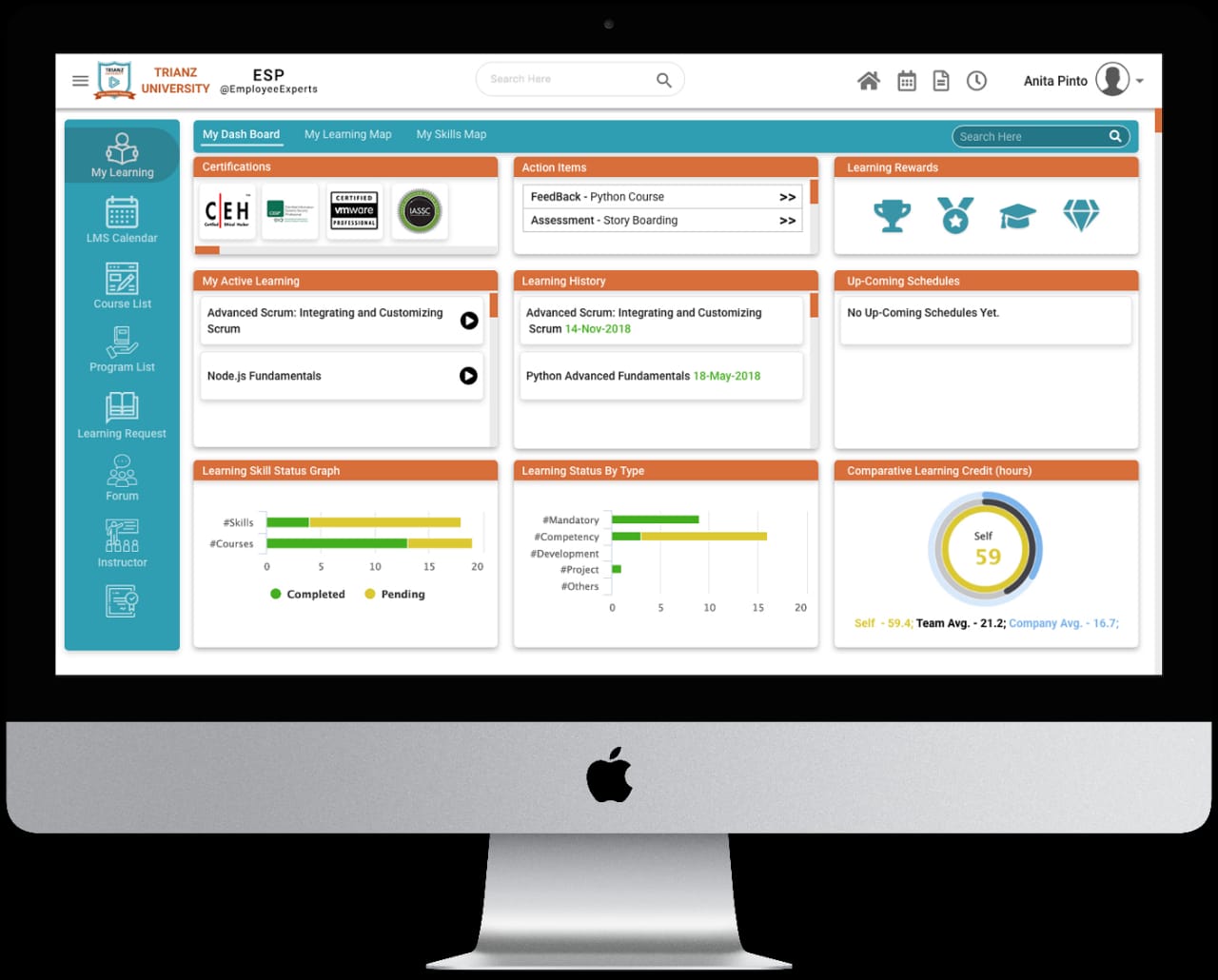
Key LMS areas included:
- My learning dashboard
- Learning calendar
- Course list and program list
- Learning requests
- Forum and instructor areas
- Certifications and assessment actions
- Active learning and learning history
- Learning status graphs and comparative learning credit views
The dashboard was designed around scanning. Users could quickly understand what they were learning, what actions were pending, what rewards or certifications were available, and where they stood compared with learning expectations.
Design Process
My approach became more structured through this project. I worked in a feedback-led loop instead of waiting until the end to show final screens.
| Stage | What I Did | Why It Mattered |
|---|---|---|
| Discover | Understood HRMS, LMS, payroll, attendance, leave, team, and admin workflows | Built context before designing screens |
| Define | Framed user roles, landing-page priorities, and module boundaries | Reduced confusion between employee, manager, HR, and admin needs |
| Ideate | Explored ways to group high-frequency actions into a single landing page | Led to the three-column command-center model |
| Low Fidelity | Created wireframes and rough flows for layout, hierarchy, and navigation | Kept feedback focused on structure instead of visual styling |
| High Fidelity | Designed polished screens, states, dashboards, and responsive behavior | Made product direction clear for stakeholders and engineering |
| Prototype | Connected important flows for review and discussion | Helped stakeholders experience the product before development |
| Test | Took feedback from product owners, project leads, development leads, and representative stakeholders | Reduced late conflicts and improved decision quality |
| Ship | Supported implementation, responsive fixes, QA, and iteration | Moved faster because alignment happened continuously |
The key principle was simple: bring stakeholders into the process at every important decision point. This made the work faster, reduced end-stage confusion, and helped engineering build with more confidence.
Information Architecture
The ESP platform had many modules, so the information architecture had to support both breadth and focus.
I separated the product into three layers:
Daily Employee Layer
High-frequency tasks such as attendance, leave, payroll visibility, project work, time tracking, and personal updates.
Team & Collaboration Layer
Team availability, communication, status, leave visibility, collaboration, and workplace connection.
Operational Admin Layer
HR configuration, payroll operations, learning administration, user management, approvals, policies, reporting, and system-level management.
This separation helped keep the employee experience simple while still supporting deeper admin workflows behind the scenes.
UX Patterns Created
Across the ESP platform, I created repeatable patterns that could be reused across modules:
- Dashboard cards for status, summaries, and next actions
- Approval and notification patterns for manager workflows
- Data table patterns for HR and admin views
- Form patterns for requests, employee records, and configuration
- Empty, loading, and validation states
- Mobile bottom navigation for the three primary landing sections
- Visual status indicators for availability, pending actions, and completion
- PWA-friendly responsive layouts for app-like access
These patterns reduced repeated decisions and helped the platform feel like one connected product instead of many disconnected modules.
Website Work
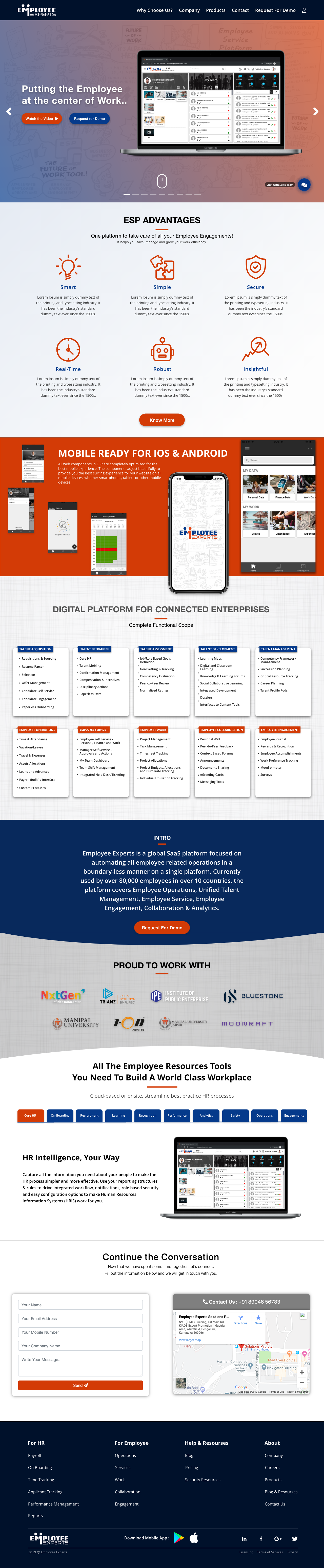
Along with the product experience, I designed and implemented the Employee Experts website. The website needed to explain the platform, highlight product advantages, show mobile readiness, communicate module coverage, and support demo requests.
The website work helped connect product UX with business communication. It was not only a marketing page. It explained the product architecture and helped potential customers understand the scope of the platform.
Impact
- Designed and implemented a SaaS HRMS and LMS platform experience from scratch
- Created a strong three-column employee landing page that brought personal work, team activity, and action items into one view
- Translated the desktop information architecture into a mobile/PWA model using bottom-menu sections
- Built the LMS dashboard around learning progress, certifications, schedules, rewards, and action items
- Designed the Employee Experts website to support product storytelling and demo conversion
- Created reusable UI and workflow patterns across employee, manager, HR, payroll, LMS, and admin experiences
- Developed early product judgment by balancing usability, engineering feasibility, stakeholder feedback, and business needs
What This Project Proves
This project shows my foundation as a product designer who can think beyond screens.
I was not only designing individual UI pages. I was shaping the structure of an enterprise workforce product: what users see first, how they move between daily work and team activity, how managers take action, how mobile users access the same model, and how the product is explained publicly through the website.
For an early-career project, ESP gave me the kind of product ownership that still influences how I design today.
Learnings
1. The landing page is a product strategy decision. The three-column layout worked because it reflected how employees think: me, my team, and my pending work.
2. Mobile needs its own interaction model. Converting three desktop columns into bottom-menu sections preserved the same concept while making it usable on small screens.
3. Stakeholder feedback should happen before opinions harden. Reviewing low-fidelity, high-fidelity, prototype, and test stages with product and engineering leaders reduced confusion and made delivery faster.
4. Early ownership builds strong product instincts. Designing HRMS, LMS, website, admin, mobile, and PWA experiences together taught me to connect details with the larger product system.